
Dashboard Overview
Understanding the AICE Power dashboard navigation and layout.
The AICE Power dashboard is your central hub for monitoring energy consumption across all your sites.
Layout
| Area | Position | Purpose |
|---|---|---|
| Sidebar | Left | Main navigation between pages, with expandable sections |
| Toolbar | Top | Site selector, category filter, DJU toggle, date range picker, refresh |
| Content area | Center | Charts, stat cards, and metrics for the selected view |
| Rene AI panel | Right (toggleable) | AI assistant for natural language questions about your data |
Sidebar navigation
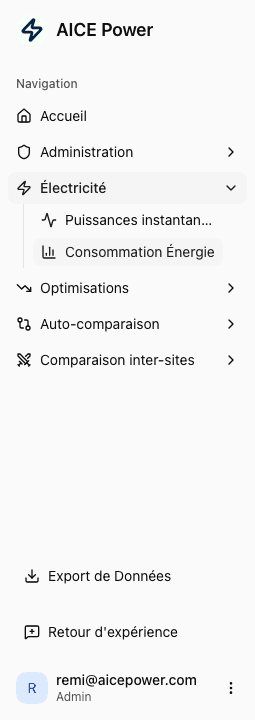
| Section | French label | Purpose |
|---|---|---|
| Welcome | Accueil | Portfolio overview with leaderboard and weekly trends |
| Administration | Administration | User management and site configuration (admin only) |
| Electricity | Electricite | Parent section for power and consumption pages |
| - Live Power | Puissances instantanees | Real-time power measurements from all sensors |
| - Energy Consumption | Consommation Energie | Historical consumption with disaggregation |
| Optimisations | Optimisations | Parent section for cost analysis and AI insights |
| - Electricity Costs | Couts Electricite | Cost breakdowns by category, sensor, and tariff |
| - Savings Simulator | Simulateur d'Economies | Model potential savings scenarios |
| - Recommendations | Recommandations | AI-generated insights by severity level |
| - Alerts | Alertes | Anomaly notifications and alert monitoring |
| Self-comparison | Auto-comparaison | Compare a site against itself across time periods |
| - Global | Globale | Overall consumption comparison |
| - HVAC | CVC | HVAC-specific comparison with DJU normalization |
| Cross-site comparison | Comparaison inter-sites | Benchmark multiple sites side by side |
| - Global | Globale | Total consumption across all categories |
| - Refrigeration | Froid | Refrigeration-specific comparison |
| - HVAC | CVC | HVAC-specific comparison |
| - Lighting | Eclairage | Lighting-specific comparison |
| Data Export | Export de Donnees | Download your data in various formats |
| Feedback | Retour d'experience | Experience reports and feedback |
Toolbar controls

The toolbar at the top of each page provides context-aware controls. Not all controls appear on every page.
| Control | Description |
|---|---|
| Site selector | Dropdown showing your current site name and location (all pages) |
| Selectionnez une categorie | Filter data by equipment type (some pages) |
| Corrige DJU | Toggle DJU weather normalization (consumption and comparison pages) |
| Par m2 | Normalize values per square meter (comparison pages) |
| Date range picker | Shows the selected period (e.g., "Mar 23 - Mar 29, 2026") |
| Actualiser | Refresh all data on the page |
| Toggle Rene | Show/hide the AI assistant panel |